
harmonIQ
2026 · Product Builder
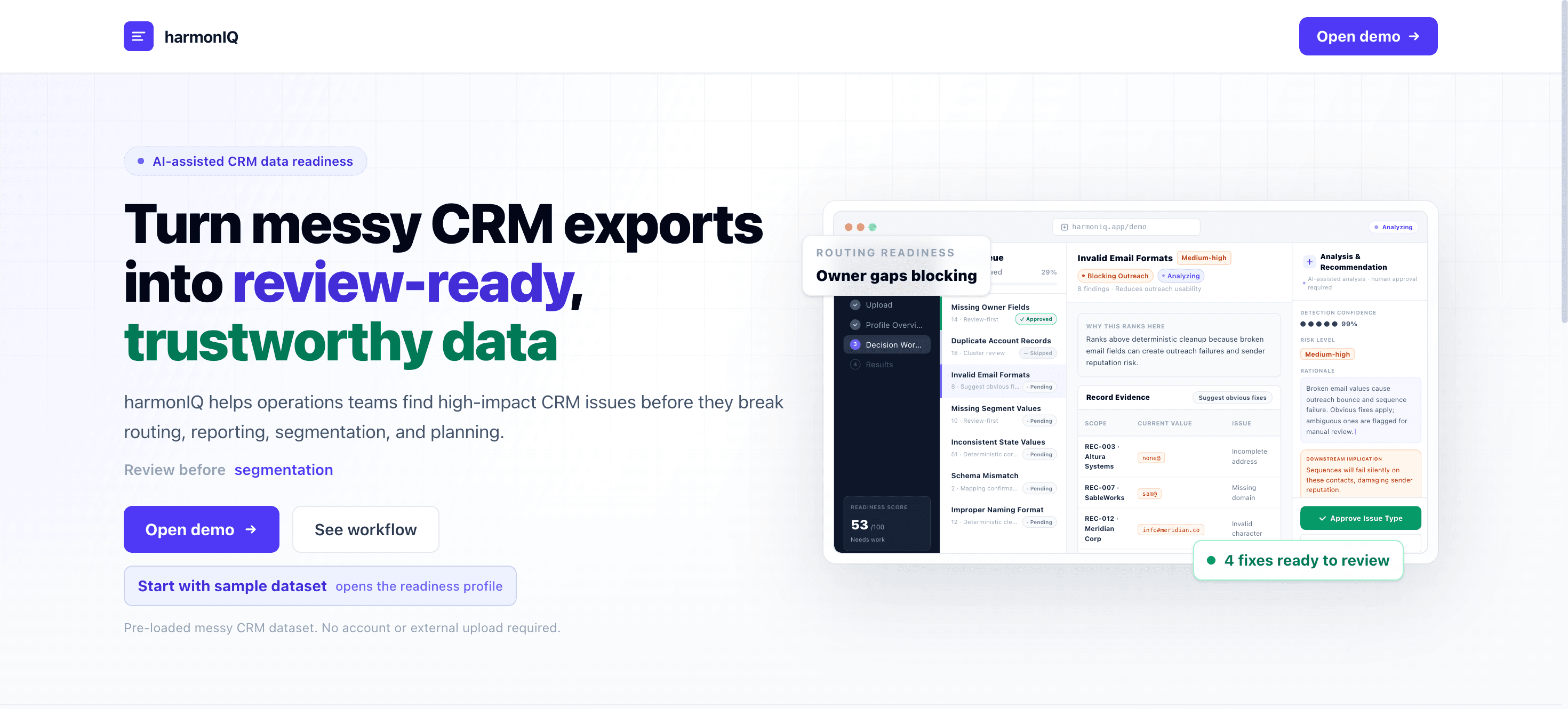
AI-assisted CRM data-readiness workspace that profiles risky records, explains recommended fixes, and exports business-ready data.
Tested with five sales and CRM users, whose feedback simplified the review flow and reprioritized missing-context alerts before launch.
harmonIQ is a CRM data-readiness workspace built for RevOps and Sales Ops teams preparing an account or contact export before a routing update, planning cycle, or campaign. It profiles the dataset, ranks issues by business impact rather than raw frequency, explains each recommended fix in plain language, and lets the user review, approve, or edit every change before exporting a business-ready CSV and a change log.
Key Product Decision
harmonIQ could have auto-corrected every issue it detected. I chose to rank issues by business impact and require review before anything changes, because CRM data drives revenue decisions — a fast fix nobody trusts is worse than a slower one people will actually approve.
Product Thesis
Bad CRM data is not a formatting problem. It is an operational-risk problem — the same messy export can break routing for one team and reporting for another, depending on what happens to it next.
Product Bet
Ranking issues by downstream business impact, and requiring human review before export, builds more trust than a tool that "auto-cleans" everything invisibly.
Operations teams inherit CRM exports full of duplicate accounts, missing owners, inconsistent state and country values, and invalid contact fields. These are not just formatting issues — they break lead routing, distort reporting, and erode trust in the CRM before a team can act on the data. Today, non-technical operators either wait on engineering support or clean the file manually with no clear view of what actually matters first.
Missing owner fields and inconsistent state values silently break lead routing and territory assignment downstream.
Spreadsheet cleanup has no way to rank which issues are actually business-critical versus cosmetic.
Automated cleanup tools that apply fixes without review are difficult to trust with CRM data that drives revenue decisions.
Built for Revenue Operations and Sales Operations managers who receive a CRM export before a routing update, planning cycle, or campaign and need to know which issues to fix first, without waiting on engineering.
Primary User
Revenue Operations and Sales Operations managers who own CRM hygiene before routing, reporting, or campaign workflows and need to move fast without specialized data tooling.
Job To Be Done
Show me which issues in this export actually matter, let me review the fix before it happens, and give me a clean file and a record of what changed.
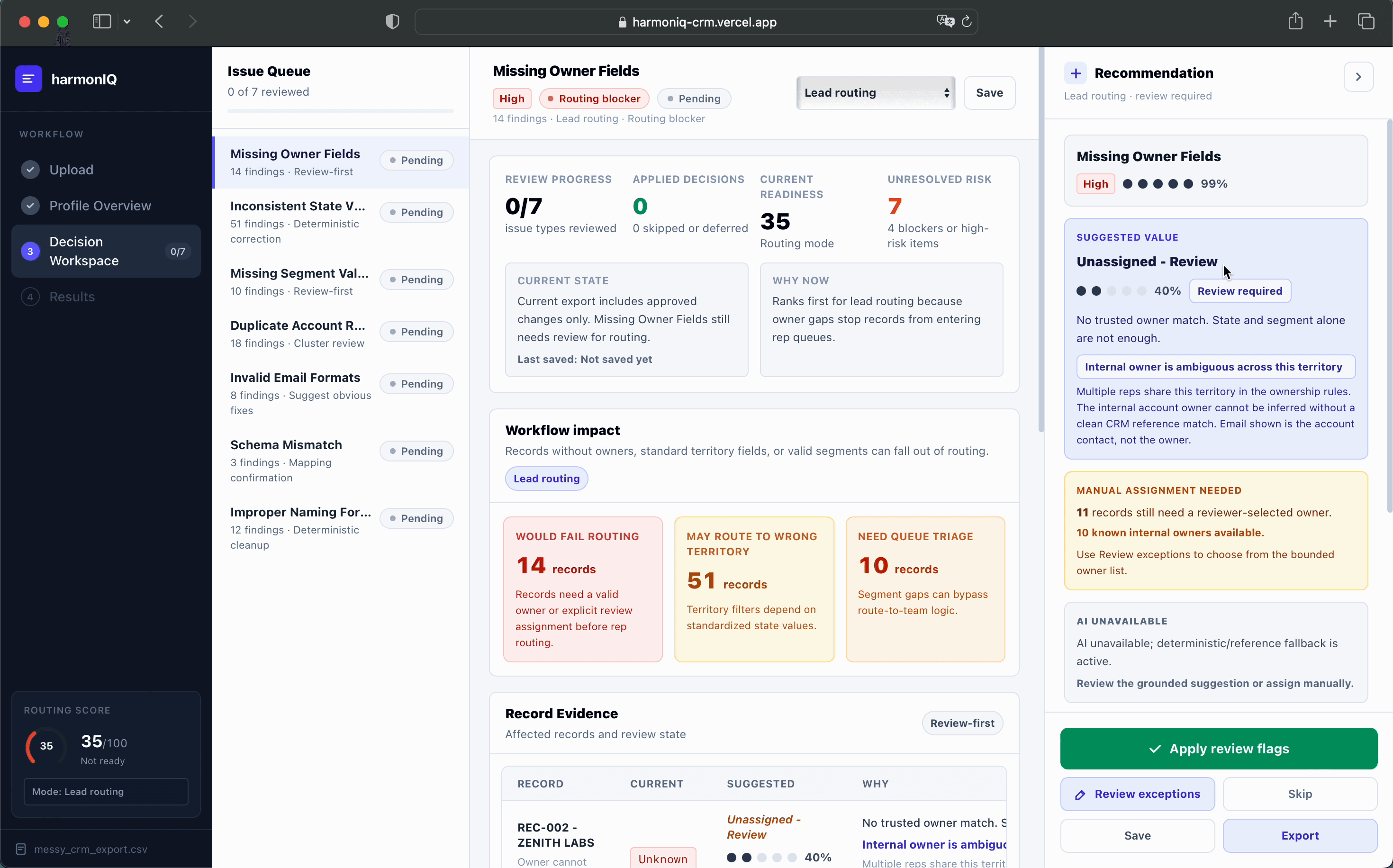
harmonIQ profiles an uploaded CSV, classifies issues into categories like missing owners, duplicate accounts, and inconsistent formatting, then ranks them by business severity, affected record count, and workflow urgency rather than raw frequency. Each recommendation includes a plain-language rationale and confidence signal, and the user can approve, skip, or manually resolve exceptions before exporting a cleaned CSV and change log.
Business-Risk Profiling
Classifies detected issues — missing owners, duplicates, inconsistent formatting, schema mismatches — and ranks them by how much they threaten routing, reporting, or segmentation, not by how often they occur.
Explainable Recommendations
Every suggested fix carries a rationale, a confidence signal, and a preview, so the user can judge whether to trust a specific recommendation instead of accepting a black box.
Reviewable Export
Users approve, skip, or manually resolve exceptions issue by issue before exporting a cleaned CSV and a change log that documents what was changed and why.
harmonIQ decision workspace
Tested with five sales and CRM users, whose feedback simplified the review flow and reprioritized missing-context alerts before launch.
Testing with five sales and CRM users simplified record review, reprioritized missing-context alerts, and reinforced user control over recommended changes.
User Feedback Loop
Testing with five sales and CRM users led to a simpler review flow and reprioritized alerts for missing ownership and context.
Scope Signal
The strongest feedback validated the core workflow: profile the data, explain the risk, preserve user review, and export a cleaner file.
The MVP prioritized explainable risk scoring, recommended fixes, and user review so every change stayed auditable.
Explainable Risk Scoring
The workflow centers data profiling and explainable risk scoring so users can see what matters before deciding what to fix.
Review Before Export
Recommended fixes stay behind user review and approval, which keeps the workflow auditable and easier to trust.
The hardest product call was resisting the urge to make harmonIQ do everything a full ETL or master-data tool does. Narrowing V1 to one workflow, profiling and reviewing a CRM export before it causes downstream damage, made the trust model easier to design and the demo easier to explain.
What I Cut
Broader automation and expanded workflow coverage. Each would have expanded scope without strengthening the one pre-import workflow the product needed to prove.
What Remained
Profiling, business-risk ranking, explainable recommendations, and a reviewable export: the smallest set of steps that makes a messy CRM export trustworthy again.